
A legacy backup tool for Mozilla profiles
MozBackup is a free utility for creating backups of Firefox, Thunderbird, and other Mozilla-based application profiles. It preserves bookmarks, history, emails, extensions, passwords, and settings in a portable file for OS reinstalls or profile recovery. While it’s easy to use, the tool has not been actively updated since 2012, with support only documented for Mozilla applications up to Firefox 62 and Thunderbird 60. This makes compatibility with newer releases unreliable.
Top Recommended Alternative

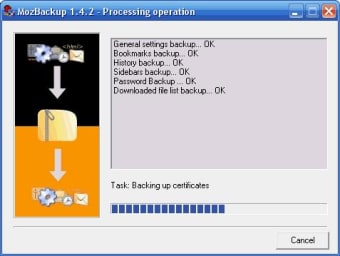
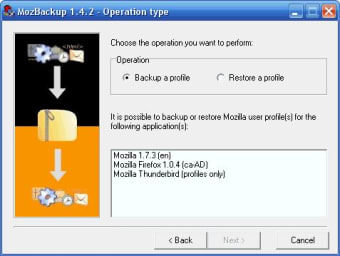
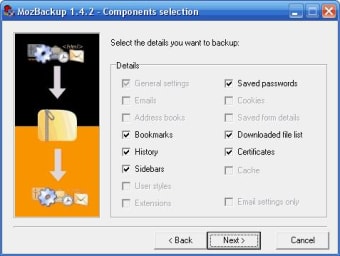
Designed for simplicity, MozBackup uses a step-by-step wizard that makes selecting profiles, choosing backup components, and restoring data straightforward. It supports both full and partial backups. However, the lack of automation, cloud integration, and modern interface features makes it less suitable for ongoing, hands-off protection.
Profile backups made simple
The program’s wizard-driven interface guides users through the process in clear, logical stages. Profile selection is straightforward, with backup components like emails, bookmarks, and browsing history presented as checkboxes for easy inclusion or exclusion. Backups are saved as .pcv archives, which can be stored locally, on external drives, or transferred to another machine for restoration. This design keeps it accessible even for less technical users looking for a quick, dependable backup tool.
Performance is generally smooth for smaller profiles, but large ones—especially those containing extensive email data—can slow operations or cause temporary hangs during restore. Disk activity can spike with heavy profiles, though memory usage remains modest. Although MozBackup includes command-line parameters that allow scheduling through Windows Task Scheduler, it lacks a built-in scheduler. This means users must set up automation themselves, which can limit reliability for less technical workflows.
MozBackup’s main drawback is its dated codebase. With no active development for years, it lacks compatibility with newer Firefox and Thunderbird builds, making it best suited for older setups. For users on modern versions seeking more features, actively maintained alternatives with automation or cloud integration may be a better fit.
Best suited for older Mozilla setups
MozBackup remains a functional, lightweight choice for manual backups of older Mozilla profiles. It’s free, easy to operate, and flexible with partial or full backups, but its lack of updates, automation, and modern integration limits its appeal for current systems. For users with legacy installations or minimal backup needs, it still offers a straightforward, dependable way to safeguard essential data without extra complexity.



.png)